Before Your App Hits the Play Store, Here’s What You Need to Know
The real work begins behind the scenes, from setting up a developer account and verifying your business identity to configuring payments and ensuring platform compliance. Whether you’re publishing your first app, planning a major launch, or moving from an individual to an organisation account, the Google Play Console is your all-in-one dashboard for managing, testing, and launching apps. This guide walks you through the prerequisites, costs, timelines, and essential steps you need to complete to get your app live and ready to reach millions of users.
What is Google Play Console?
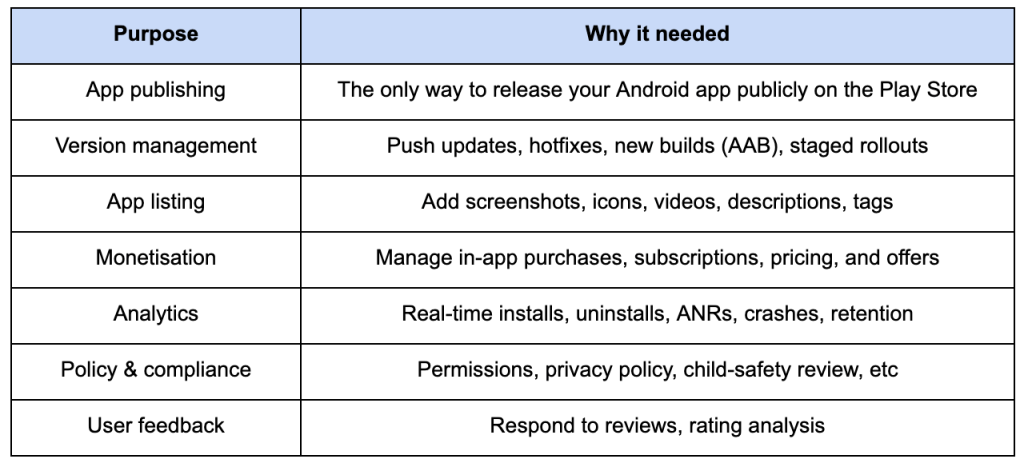
Google Play Console is the back-end control panel for everything related to your Android apps on the Google Play Store. Think of it as your publisher dashboard, where you upload, manage, analyse, monetise, and optimise your apps after development.
Why do we need Google Play Console?
You need a Google Play Console account because you cannot publish apps on the Google Play Store without it. Google doesn’t allow direct APK uploads to the Play Store, everything goes through this console. Without Play Console, your app never reaches real users. (Publicly)
How is the Google Play Console used in daily app management and operations?
Here are the practical use cases:
- Uploading builds ( Android App Bundle – AAB )
- Testing ( Internal, Closed, Open beta testing )
- Country rollout & Geo targeting
- Running pre-registration campaigns
- Checking installs & retention data
- App store listing optimisation
- Publishing updates/patches
- Managing developers & roles ( Team access control )
- Viewing crash logs ( with Firebase integration )
- Monetisation setup ( IAP, subs )
- Policy warnings & compliance notices
- Feature or event promotion
Who can use Google Play Console?
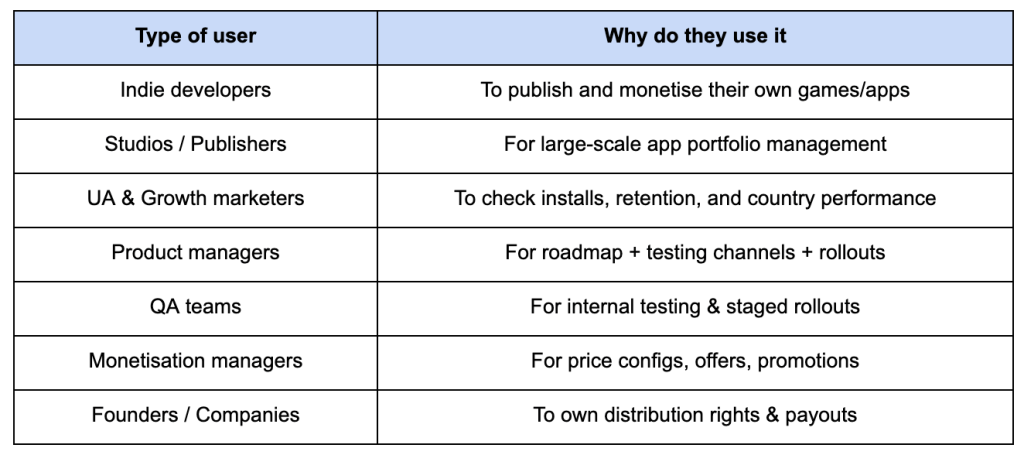
Basically, Anyone involved in shipping/managing apps can (or should) use it.
In short, Google Play Console is the mission control for Android apps without it, your app never reaches users, cannot be updated, and cannot generate revenue.
What are the requirements for a Google Play Console developer account?
- Google Account ( Gmail )
- Govt-issued ID ( for identity verification )
- Debit/Credit Card → ( one-time registration fee )
- Business details ( if registering as an Organisation )
Steps to create the Google Play Console developer account:
- Visit https://play.google.com/console
- Sign in using your Google account
- Accept the developer distribution Agreement
- Pay the $25 one-time registration fee
- Choose account type → Individual or Organisation
- Submit identity verification documents ( ID proof )
- Once approved → You can submit and publish apps ( add unlimited apps )
Creating a payment profile on Google Play Console (for revenue & payouts):
Google uses a payment profile to process and pay out earnings ( Paid apps / IAPs / Subscriptions )
The D-U-N-S verification for organisations may take a few days to a couple of weeks, depending on the country and the correctness of the business listing.
What are the reasons behind Google Play Console account terminations?
Google enforces strict policies to maintain a safe and trustworthy environment for users. Common reasons for account terminations include:
- Policy Violations: Breaching the developer program policies or the developer distribution agreement.
- High-Risk Behaviour: Engaging in practices that may harm users or devices, such as malware distribution or deceptive behaviour.
- Association with Terminated Accounts: Linking your account with previously terminated accounts can lead to suspension.
- Verification Failures: Issues during the identity verification process can result in account restrictions.
- Inactive Accounts: Prolonged inactivity without logging into the console can lead to account closure.
Step-by-Step process to recover a terminated Google Play Console account:
If your account has been terminated, follow these steps to attempt recovery:
- Review the Termination Notice: Understand the specific reason for the termination provided by Google.
- Address the Issue: Rectify any violations or issues that led to the termination.
- Appeal the Decision: Submit an appeal through the Google Play Developer support form, providing detailed information and evidence of corrective actions taken.
- Wait for Response: Google will review your appeal and respond with its decision.
- Please note that recovery is not guaranteed, and repeated violations may lead to permanent suspension.
Note: Please note that recovery is not guaranteed, and repeated violations may lead to permanent suspension.
What are the preventive measures to avoid Google Play Console account terminations?
To minimise the risk of account termination:
- Adhere to Policies: Regularly review and comply with Google’s Developer program policies and developer distribution agreement.
- Maintain Account Activity: Log into your play console periodically to prevent inactivity-related closures.
- Use Trusted Payment Methods: Ensure that the payment methods used for registration are valid and belong to you.
- Avoid Account Associations: Do not link your account with previously terminated or suspicious accounts.
- Implement Robust App Security: Regularly audit your apps for security vulnerabilities and ensure they do not harm users or devices.
No matter how great your app is, it can’t live on Google Play without the Play Console.