Meta Ad Objectives, Platforms & Placements, Creatives, Ad Formats, Ad Types, Sizes & Best Practices
When running Meta Ads, choosing the right objective, ad format, and creative size is essential for maximizing performance. Whether you’re aiming for brand awareness, app installs, or sales, each campaign objective requires specific creative recommendations to ensure the best results.
This article breaks down Meta Ad objectives, recommended Platforms and Placements, Creative Formats, and the correct Ad sizes for each goal to understand for beginners and professionals. Here’s a detailed breakdown:
Understanding Meta Ad Objectives
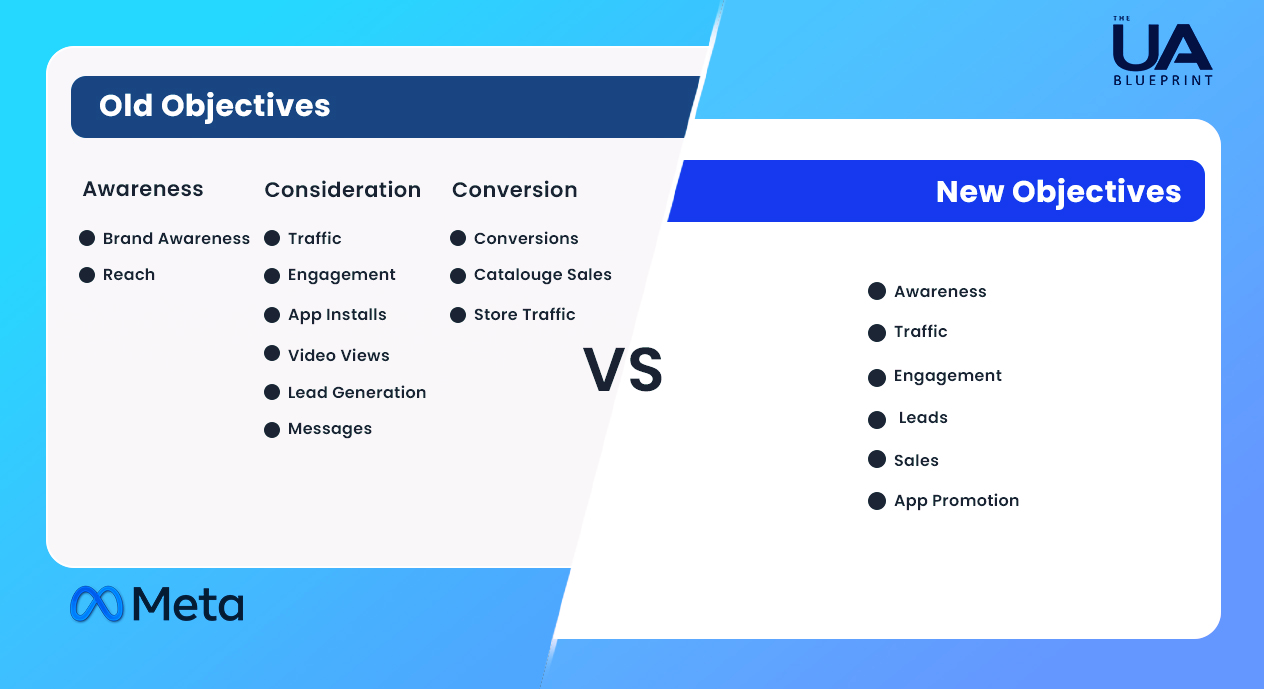
Objectives are the business goals for Meta ad campaigns. They help Meta ads optimize for the best results. Meta has simplified its ad objectives to align campaign creation with business goals. Previously, there were 11 objectives. Later in 2024, old objectives will no longer be available for new campaigns. They have combined the previous 11 objectives into 6 objectives.
What Are The Old Meta Objectives & New Meta Objectives?
Changes Made In The Meta Objectives
👉 Brand awareness is folded / under the Awareness objective
👉 Reach is folded / under the Awareness objective
👉 Traffic has no changes, still existing
👉 Engagement has no changes, but a few added ( Messages, Video views, Conversions )
👉 App installs are now changed to App promotion
👉 Video views moved to Engagement
👉 Lead generation has now changed to Lead objective
👉 Messages moved into Engagement or Leads
👉 Conversions are replaced by Engagement, Leads or Sales
👉 Store Traffic is changed to Awareness
Here Is The List Of Ad Objectives You Find While You’re Creating A Meta Ad Campaign
Choose the right objectives for your niche.
👉 Choose what you want people to do when they see your ads.
👉 Your campaign objective should align with your overall business goals.
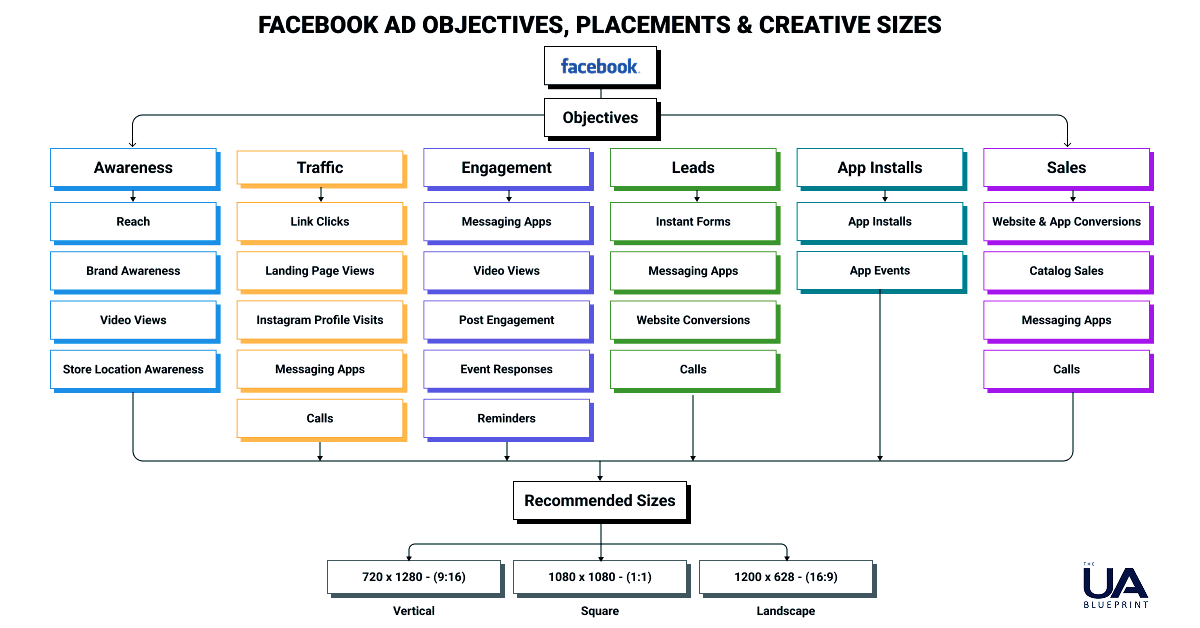
1. Awareness:
Show your ads to people most likely to remember them.
This objective is good for :
👉 Reach: Reach the maximum number of people interested in your brand.
👉 Brand Awareness: Reach people who are more likely to remember your brand.
👉 Video Views: Reach people who are more likely to watch your video.
👉 Store Location Awareness: Reach people using the physical location of your business, organisation or set of stores.
Performance goals under the Awareness objective, type of creatives to use.
✅ Maximise reach of ads: Use Single Image or video ads, Carousel ads, and Collection ads.
✅ Maximise the number of impressions: Use Single Image or video ads, Carousel ads, and Collection ads.
✅ Maximise ad recall lift: Use Single Image or video ads, Carousel ads, and Collection ads.
✅ Maximise ThruPlay views:Use Video ads only, no Image ads.
( Basic 3 sizes as mentioned below )
✅ Maximise 2-second continuous video plays: Use Video ads only, no Image ads.
( Basic 3 sizes as mentioned below )
2. Traffic:
Send people to a destination, such as your website, App, Instagram profile or Meta event.
This objective is good for :
👉 Link clicks: Get people to click on a link to your website, app or Meta event.
( Increase Website traffic )
👉 Landing page views: Get people to view content on your landing page.
👉 Instagram profile visits: Get people to visit your Instagram profile.
👉 Messaging Apps: ( Messenger, Instagram and WhatsApp )
Send people to Messenger, Instagram or WhatsApp to start a conversation with you.
👉 Calls: Get people who may be interested in your business to call you.
Performance goals under the Traffic objective & type of creative to use.
Choose where you want to drive traffic:
✅ Website: Use Flexible, Single Image or Video, Carousel, and Collection ads.
✅ App: Use Single Image or Video ads, Carousel ads, and Collection ads.
✅ Messaging Apps: Use Single Image or Video ads, and Carousel ads.
✅ Instagram or Meta: Use Single Image or Video ads, Carousel ads.
✅ Calls: Use Single Image or Video ads, Carousel ads.
3. Engagement:
Get more messages and purchases through messaging, video views, post engagement, Page likes or event responses.
This objective is good for :
👉 Messaging Apps: ( Messenger, Instagram and WhatsApp )
Encourage people to start a conversation with you or initiate a purchase through messaging apps ( Drive Conversations )
👉 Video Views: Reach people who are more likely to watch your video.
👉 Post Engagement: Get people to interact with your posts ( Increase interactions )
👉 Conversions: Get people to view content, contact your business, add to a wishlist or take another action on your website or app ( Event Responses )
👉 Calls: Get people who may be interested in your business to call you.
Performance goals under the Engagement objective & type of creatives.
✅ Video views: Use video ads
✅ Post engagement: Use video ads
✅ Event responses: Use video ads
✅ Reminders set: Use video ads
Only video ads are allowed to target the audience. Each video should be no more than 15 seconds in duration.
4. Leads:
Choose where you want to generate leads and collect leads for your business or brand.
This objective is good for :
👉 Instant forms: Find people who are willing to share their contact information and other details by filling in a form. ( Collect user information )
👉 Messaging Apps: ( Messenger, Instagram and WhatsApp ) Find people who are willing to share their contact information and other details through chat (Capture leads through chats )
👉 Website Conversions:Get people to share their contact information, complete a registration form, submit an application or take another action on your website or app.
( Submissions & Registrations )
👉 Calls: Get people who may be interested in your business to call you.
Performance goals under the Leads objective & creative types.
✅ Website: Use single image or video ads, carousel ads (Image/video) and collection ads.
✅ Website & Calls: Use single image or video ads, carousel ads (Image/video) and collection ads.
✅ Instant forms: Use single Image or Video ads, Carousel ads.
✅ Messenger: Use single Image or Video ads, Carousel ads.
✅ Instagram: Use single Image or Video ads, Carousel ads.
✅ WhatsApp: Use single Image or Video ads, Carousel ads.
✅ Calls: Use single Image or Video ads, Carousel ads.
✅ App: Use single Image or Video ads, Carousel ads and Collection ads.
5. App Promotions:
Find new people to install your app and continue using it.
This objective is good for:
👉 App Installs: Get people to install your app ( New users )
👉 App Events: Get people to make an in-app purchase or take another action in your app, like sign-ups.
Performance goals under the app promotions objective & creative types.
✅ Maximise the number of app events:
✅ Maximise the number of app installs:
✅ Maximise the number of link clicks:
For the above 3 goals, Use Flexible ads. Single image or video ads and carousel
( 10 images / 10 videos = Total 10 creatives )
6. Sales:
Find people who are likely to purchase your product or service.
This objective is good for :
👉 Website & App Conversions: Get people to add an item to their basket, make a purchase, start a subscription or take another action on your website or app.
👉 Catalogue Sales: Get people to buy products or services from your catalogue.
👉 Messaging Apps: ( Messenger, Instagram and WhatsApp ) Get people to initiate a purchase through Messenger, Instagram and WhatsApp.
👉 Calls: Get people who may be interested in your business to call you.
Performance goals under sales objective & creative types.
✅ Website: Use flexible ads, single image or video ads, Carousel ads, and Collection
✅ Ads App: Use flexible ads, single image or video ads, Carousel ads, and Collection ads.
✅ Website & App: Use single image or video ads
✅ Messaging App: Use single image or video ads, Carousel ads.
✅ Calls: Use single image or video ads, Carousel ads.
✅ Website & Calls: Use single image or video ads, Carousel ads and Collection ads.
Understanding Platforms & Placements In Meta Ads
When you run Meta ads, they can appear on different platforms and placements. Let’s see what they are:
Here are the differences between Platforms and Placements:

1. Platforms ( Where Ads Can Run )
These are the different apps and services where your ads can appear:
👉 Meta ( Main app )
👉 Instagram ( Owned by Meta )
👉 Messenger ( Meta’s messaging app )
👉 Audience Network ( Meta shows ads on Third-Party partner apps and websites )
2. Placements ( Where Within Each Platform Ads Can Appear )
A placement refers to the specific location where your ad is shown within a platform.
Here are the key placements for each platform:
✅ Meta Placements:
👉 Feed Ads: Appear as posts in users’ News Feeds.
👉 Stories Ads: Full-screen ads in Meta Stories.
👉 Right Column Ads: Appear on the right side of Meta ( Desktop only ).
👉 Marketplace Ads: Appear when users browse Meta Marketplace.
👉 Video Feed Ads: Appear in the Meta Video Feed.
👉 Search Ads: Appear in Meta search results.
👉 In-Stream Video Ads: Play inside longer videos as mid-roll ads.
✅ Instagram Placements:
👉 Instagram Feed Ads: Appear as posts in the Instagram Feed.
👉 Instagram Stories Ads: Full-screen vertical ads in Stories.
👉 Instagram Reels Ads: Short video ads in Instagram Reels.
👉 Explore Ads: Appear when users browse Instagram’s Explore tab.
✅ Messenger Placements:
👉 Messenger Inbox Ads: Appear inside a user’s Messenger inbox.
👉 Messenger Stories Ads: Full-screen ads in Messenger Stories.
👉 Click-to-Messenger Ads: When clicked, they open a conversation with your business in Messenger.
✅ Audience Network Placements:
👉 Banner Ads: Appear as banners on partner websites and apps.
👉 Native & Interstitial Ads: Full-screen ads in third-party apps.
👉 Rewarded Video Ads: Ads in apps where users get rewards for watching.
Choosing The Right Platforms & Placements For Your Meta Ads That Help You:
👉 Reach your audience where they spend time.
👉 Get better results based on user behavior.
👉 Optimize costs by testing different placements.
You can let Meta choose placements automatically or manually select specific placements depending on your campaign goals.
Understanding Meta Ad Formats
Meta offers various ad formats and types to help businesses reach their marketing goals. Understanding these options is crucial for running successful campaigns.
Basic Ad Formats On Meta:
A Meta ad format is the basic structure of an ad, such as a single image with text, a video, or an interactive experience. Meta offers 7 main ad formats that allow advertisers to create various ads for different objectives.
Let’s see the ad formats before exploring the different Meta ad types.
Meta Ad Format Types:
Meta ads are created based on specific objectives like brand Awareness, Conversions or Lead Generation. Each objective has a corresponding ad type optimized to achieve that goal.
There Are Two Main Ways To Create Meta Ads:
👉 From Your Meta Page: A quick and simple way to create ads.
👉 From Meta Ads Manager: Offers more customization and advanced targeting options.
Understanding both platforms will help you create the most effective ads for your business.
Types Of Ads On Meta Page & Ads Manager
Ads created from your Meta Page:
The easiest way to create Meta ads is directly from your Meta page. By clicking the Promote button, you can quickly set up ads for your brand. However, not all ad types are available from your Page.
Here are the ones you can create:
👉 Boosted Posts: Expands the reach of an existing post.
👉 Page Likes Ads: Encourages users to like your Meta page.
👉 Website Visitors Ads: Drives traffic to your website.
👉 Website Purchases Ads: Encourages online purchases.
👉 Automated Ads: Uses AI to optimize ad performance.
👉 Lead Ads: Collects customer contact details (also available in Ads Manager).
👉 Event Ads: Promotes events (also available in Ads Manager).
Ads created from Meta Ads Manager:
Meta Ads Manager offers more advanced ad creation options, audience targeting and customization.
Here are the ad types available in Ads Manager:
👉 Event Ads: Promotes events and increases attendance.
👉 Offer Ads: Highlights special discounts or offers.
👉 Lead Ads: Collects customer information easily.
👉 Dynamic Creative Ads: Automatically generates the best-performing ad variations.
👉 Dynamic Ads: Retargets users based on past interactions.
👉 Mobile App Ads: Promotes app installs and engagement.
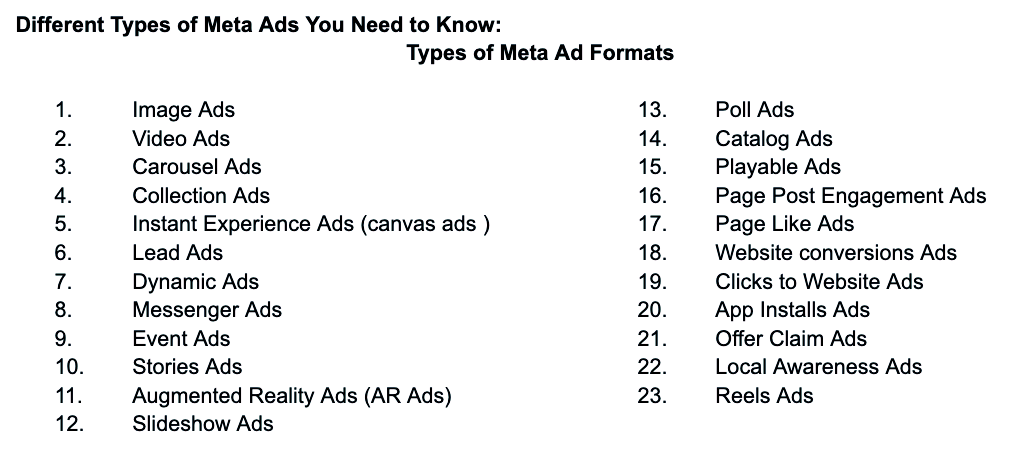

Types Of Meta Ad Formats
1. Image Ads
Image ads are the most common type of Facebook ads. They are simple and easy to create, making them a popular choice for businesses. Image ads can be used to promote a product or service, showcase an event, or drive traffic to a website.
Benefits: Visually appealing, Attention-grabbing, Easy to create.
2. Video Ads
Video ads are a powerful way to engage your audience on Facebook. They allow you to tell a story, demonstrate a product or share valuable information, all in a visually appealing and informative way. Video ads can be up to 240 minutes long, but shorter videos tend to perform better. This is because people have shorter videos, and they are more likely to watch and engage.
Benefits: Highly engaging, Informative and Persuasive.
3. Carousel Ads
Carousel ads are a type of ad that allows you to showcase multiple images or videos, tell a story or highlight different features of a single product. Users can swipe through the carousel to view each image or video.
Benefits: Showcases multiple products, Storytelling, Interactive.
4. Collection Ads
Collection ads are designed to showcase multiple products in a single ad. They allow users to browse through a collection of products and click on individual items for more information. Collection ads are great for e-commerce businesses looking to drive sales and increase brand awareness
Benefits: Shoppable ads, Engaging, Product discovery, Personalised experience.
5. Instant Experience Ads (Canvas Ads)
Instant Experience ads, formerly known as Canvas ads, are a type of full-screen ad that provides an immersive experience for users. They allow you to combine images, videos, and other interactive elements to create a compelling story and engage users with your brand. Instant Experience ads are great for product demos, lead generation, and storytelling.
Benefits: Highly interactive, Great for product demos, Storytelling.
6. Lead Ads
Lead ads are designed to help businesses collect leads from Facebook users without sending them to an external website. When users click on a lead ad, they see a form that’s already filled with their contact information from their Facebook profile. They can review the information and make any changes before submitting the form. Lead ads are great for generating leads and building your email list.
Benefits: Pre-filled forms, Easy conversion.
7. Dynamic Ads
Dynamic ads allow you to promote relevant products or services to people who have already shown interest in your business across Facebook and Instagram. These ads are automatically generated based on user behavior and can be highly personalized. Dynamic ads are great for retargeting and driving conversions.
Benefits: Personalized, Relevant, Automated, Retargeting
8. Messenger Ads
Messenger ads allow you to reach people on Facebook Messenger with your ad. When users click on a Messenger ad, they’re taken directly to a conversation with your business in Messenger. Messenger ads are great for starting conversations with potential customers and providing personalized customer support.
Benefits: Interactive, Direct communication.
9. Event Ads
Event Ads are designed to promote a Facebook Event that you’ve created. They help you reach more people who are likely to be interested in attending your event, whether it’s online (like a webinar) or offline (like a local workshop, concert, sale, or grand opening).
Promotes events to increase attendance.
Benefits: Easy event promotion.
10. Stories Ads
Story ads allow you to reach people with your ad in Facebook Stories, which appear at the top of the Facebook mobile app. Story ads can include images or videos and can be up to 15 seconds long. They are a great way to engage users in a full-screen, immersive format.
Benefits: Highly engaging, immersive.
11. Augmented Reality Ads (AR Ads)
AR ads allow you to create an interactive experience with your product or service using augmented reality technology. Users can use their phone’s camera to try on virtual products or see how products would look in their environment.
Benefits: Immersive, Interactive.
12. Slideshow Ads
Slideshow Ads are video-like ads made from a series of static images, text, and music, which play in sequence like a short video. They’re an awesome choice if you don’t have the budget or resources for full video production.
Benefits: Eye-catching, Low cost, Uses less data, Easy to create.
13. Poll Ads
Poll Ads are interactive video ads that let you ask your audience a multiple-choice question directly within the ad. Users can tap one of the two options, and the result can either influence what they see next or just act as engagement. Poll Ads are available only for mobile placements, and they work only with videos, not static images.
Benefits: Interactive, Gathers feedback, High engagement
14. Catalog Ads ( Dynamic Ads )
Catalog Ads (also called Dynamic Ads with Catalog) are personalized ads that automatically promote products from your inventory to people who’ve shown interest in them, either on your website, app, or elsewhere online.
Benefits: Retargeting, Personalized, Automatic updates and Scalable.
15. Playable Ads
Playable Ads are interactive ads that allow users to try out a game or app before installing it. Users can interact with a small portion of the app/game, making it a powerful tool to drive high-quality installs and engaged users.
Benefits: Engaging, Drives high-intent users, Better ROI.
16. Page Post Engagement Ads
Page Post Engagement Ads are designed to increase visibility and interaction (likes, comments, shares, reactions, saves) on a specific Facebook post. Boost an organic post to reach more people and increase engagement.
Benefits: Increases likes, Comments and Shares.
17. Page Like Ads
Page Like Ads are designed specifically to get more people to like your Facebook Page.
Benefits: Audience Growth, Increases page likes, Better Reach.
18. Website Conversion Ads ( Conversion Ads )
Website Conversion Ads are a type of Facebook ad designed to drive specific actions (called “conversions”) on your website. This could be anything from a purchase, form submission, or adding a product to the cart, to downloading a file. These ads are shown to people who are most likely to complete your desired action.
Benefits: Drives sales, Sign-ups, Scalable.
19. Clicks to Website Ads ( Traffic Ads )
Clicks to Website Ads (also known as Traffic Ads) are designed to send users from Facebook or Instagram to a destination off the platform, such as your website, blog, product page, or app store link.
Benefits: Drive web traffic, Brand awareness, Retargeting
20. App Installs Ads
App Installs Ads are designed to get people to download or install your mobile app directly from Facebook, Instagram, Audience Network, or Messenger with deep targeting and optimization for installs or in-app actions (IAP). These ads are essential for scaling user acquisition.
Benefits: Drives installs, Engagement, Retention and App Events.
21. Offer Claim Ads
Offer Claim Ads are designed to promote special deals, discounts, or promotions and allow users to claim the offer directly from the ad. Once users claim the offer, they receive it via email or a notification, and they can use it online or in-store.
Benefits: Promotes special offers/discounts, Increases conversions, Provides notification reminders, Boosts engagement.
22. Local Awareness Ads
Local Awareness Ads are designed to reach people near your business physical location and encourage them to visit in person. They use location targeting (like city, radius or specific pin-drop) to show your ad only to nearby users, making them perfect for businesses to local customers.
Benefits: Increases store visits, Directions and calls, Awareness.
23. Reel Ads
Reels Ads are short-form vertical video ads that appear between organic reels content on Facebook and Instagram. These ads are immersive, full-screen, and swipeable, just like regular Reels.
Benefits: More Reach, Engagement, Awareness, Conversions.
Difference Between Carousel Ads, Collection Ads, Catalog Ads, Dynamic Ads & Slideshow Ads on Meta
👉 These Ads look similar. A few people were confused about the difference between them. Let us break it down in simple terms.
👉 The answer is No, these 5 ad types are different. Each one serves a unique purpose, even though some may overlap in functionality.

Conclusion: Meta provides a wide variety of ad formats and types, allowing businesses to tailor their campaigns to specific goals. Whether you’re boosting posts from your Page or running advanced campaigns through Ads Manager, testing and optimizing with different ad formats can help you find what works best, and you can achieve the best results at the lowest cost.
What Is The Difference Between Video Ads & Reels ads on Meta?
On Meta (Facebook & Instagram), both Video Ads and Reels Ads use video content, but they differ in placement, format, and engagement style. Here’s a breakdown:
Which One to Choose?
👉Use Video Ads if you want flexibility in format and placements for branding & conversions. If you want brand awareness & conversions, go for Video Ads
👉Use Reels Adsif you want higher engagement & discovery through short-form video trends. If you want more engagement & discovery, choose Reels Ads.
👉For Gaming or App Marketing, Reels Ads can be great due to their viral nature, but Video Ads provide better targeting & customization across multiple placements.

What Are The Parts Of Every Meta Ad?
There are 5 parts of every Meta ad which you should know:
1. Primary Text 2. Ad Creative 3. Headline 4. Description 5. CTA Button

Understanding Meta Ad Creative Sizes
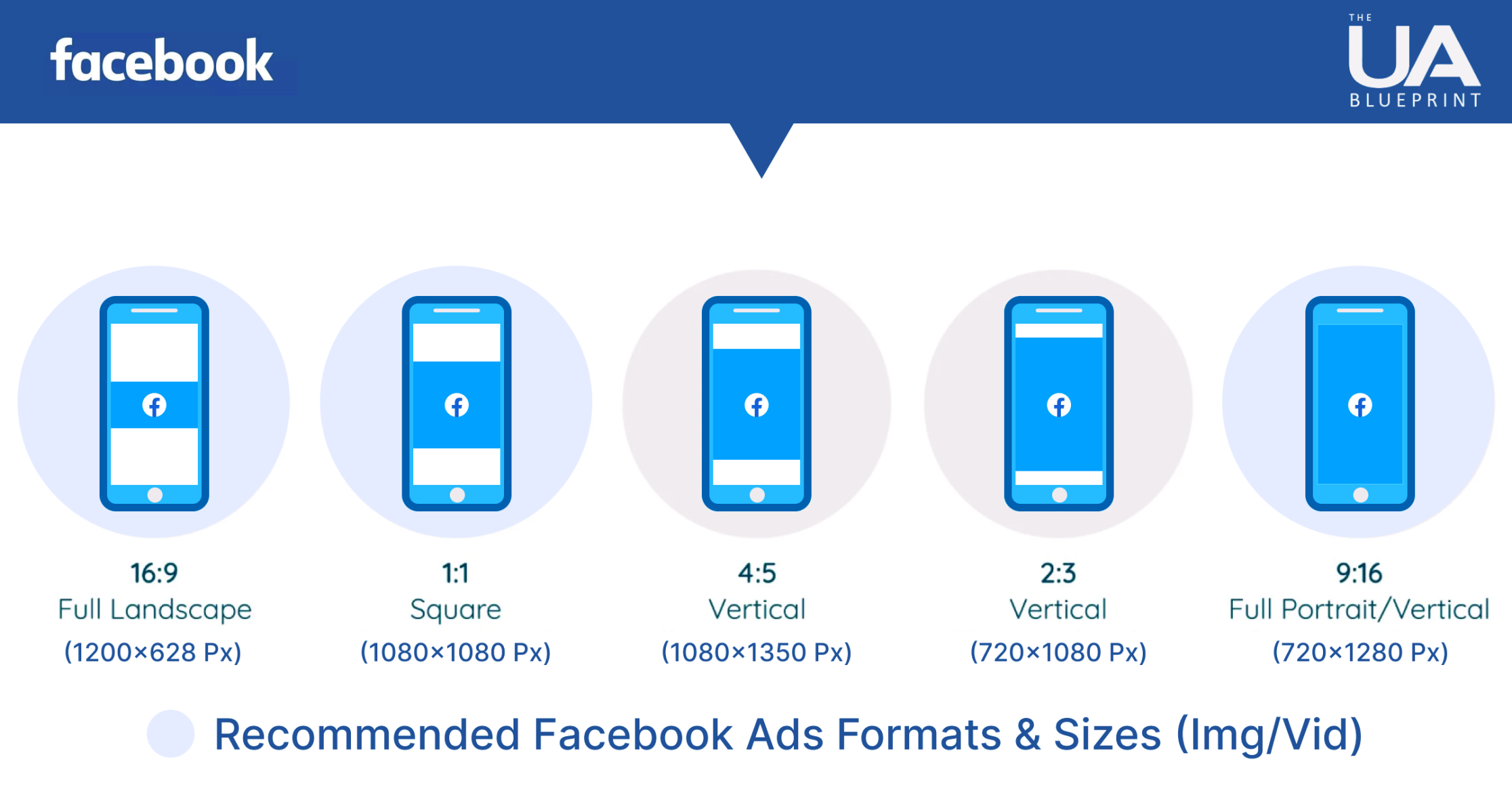
Meta Recommended sizes:
✅ 720 x 1280 – Vertical – 9:16 FHD
✅ 1080 x 1080 – Square – 1:1 FHD
✅ 1200 x 628 – Landscape – 1:91:1 FHD
What I experimented with UA creatives’ sizes are below:
✅ 1080 x 1920 Vertical – 9:16 FHD
✅ 1080 x 1080 Square – 1:1 FHD
✅ 1920 x1080 Horizontal – 16:9 FHD
✅ 1080 x 1350 Vertical – 4:5 FHD ( Optional )
Crafting Effective & Successful Meta Ads: Design, Implementation & Analysis
Here are the 30 types of Meta ad formats. You can try your ads using the categories below.


Where Do You See These Meta Ads?
Depending on your campaign settings, Meta ads can appear on various platforms and placements. Here are the main places where your ads can run.
👉 Meta Feed: Ads appear as posts in users’ News Feeds.
👉 Meta Stories: Full-screen vertical ads in Meta Stories.
👉 Meta Marketplace: Ads show up when users browse Marketplace.
👉 Meta Video Feeds: Ads appear between videos in the video feed.
👉 Meta Right Column: Ads appear on the right side (Desktop only).
👉 Meta Messenger: Ads appear in the Messenger app or as chat-based ads.
👉 Instagram Feed: Ads show up in the Instagram scrolling feed.
👉 Instagram Stories & Reels: Full-screen ads in Stories and Reels.
👉 Audience Network: Ads appear on partner apps and websites.
👉 Mate Search Results: Ads appear when users search on Meta
The Importance Of Ad Creatives In User Acquisition For Mobile Games
Ad creatives are a crucial part of user acquisition (UA) campaigns for mobile games and apps. They are the first thing potential users see, making a big impact on whether they choose to engage or install the game. Well-designed creatives can greatly improve the success of UA campaigns, so quality and design are essential.
In today’s competitive mobile gaming industry, high-quality ad creatives are more important than ever. Research shows that investing in engaging and visually appealing creatives increases user acquisition and improves retention and lifetime value (LTV), With so many ads competing for attention, standing out with unique and compelling creatives is key to success.
To run a successful UA campaign, strategies to focus on:
📌 Using different ad formats like Video ads, Playable ads & Static images ( Image ads )
📌 Testing creatives through A/B testing to see what works best.
📌 Creating high-quality, engaging content that relates to your target audience.
📌 Keep on hand at least 20 to 30 creatives in multiple size formats and keep testing them.
By applying these strategies, you can improve your UA efforts and drive more installs for your mobile game can reduce the UA cost, CPC, and CPI and increase CTR & CR.
Final Thoughts:
Choosing the right Meta Ad objective and matching it with the appropriate creative format is key to running successful campaigns. By aligning your ad creatives with your business goals, you’ll ensure better engagement, conversions, and ROI.





Unlocking tomorrow’s hits today: Trend insights , market research and ideation services for game studios.